


My Ride K-12
4.3915.00 Reviews
App Specs
- Version
- 2026.3.27
- Updated On
- License
- Free
- Downloads
- 500,000+
- Developer
- Tyler Technologies, Inc
- Categories
- Education
- Platform
- Android
Screenshots
 Analysis by AppCompare
Getting a child to school is one thing; knowing where the school bus is before the morning rush becomes stressful is another. My Ride K-12 is an education app from Tyler Technologies, Inc. that focuses on that practical gap. I used it as a companion for school transportation rather than as a general family calendar, and that distinction matters: its usefulness depends heavily on whether a child’s school district has configured the service for families.
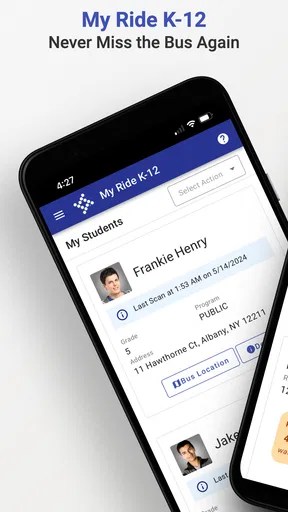
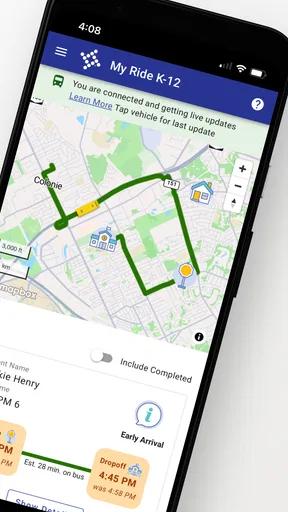
When that connection is in place, the app is built around a simple promise: help parents and students keep track of school transportation without relying entirely on guesswork. I found the idea especially useful for mornings when a bus may arrive within a narrow window, or when a child needs to know whether a normal pickup routine has changed. It is free, rated for Everyone, and belongs firmly in the education category rather than the broader navigation or travel-app space.
How My Ride K-12 fits into a real school morning
The best way to understand this app is to picture a weekday routine. A parent is preparing breakfast, a student is looking for a backpack, and nobody wants to stand outside too early or discover too late that the bus has already passed. Instead of opening a general map and trying to interpret a moving vehicle, the family can use the school transportation information presented through My Ride K-12.
That focus makes it more approachable than a standard map application for this particular job. Google Maps, Apple Maps, or a school website may help with directions and announcements, but they are not designed around the daily relationship between a student, a stop, a route, and a school transportation schedule. My Ride K-12 is more specialized, which is its main strength and also its main limitation.
I would not treat it as a replacement for every message from a school district. It is better used as one layer of the morning plan. Families still need to pay attention to school notices, weather-related changes, and any instructions sent directly by the district. The app can make transportation information easier to check, but it cannot remove the need for ordinary school communication.
The first setup is more important than it looks
The initial experience depends on getting the correct school or district connection and entering the information the service requests. This is not the kind of app where downloading it alone guarantees useful results. If the district is not participating, or if a student’s transportation details have not been associated correctly, the screen may feel much less helpful than the store summary suggests.
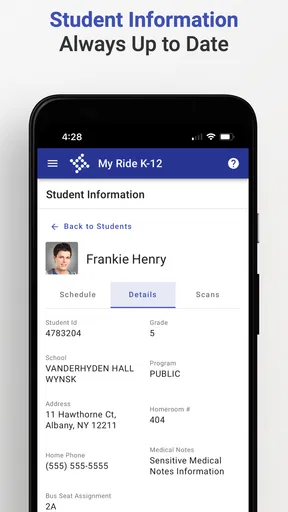
My practical advice is to set it up on a calm evening rather than five minutes before the first bus. Check the student details, confirm the displayed stop or route information, and make sure the family understands which child the information belongs to. In a household with several students, that small habit can prevent someone from checking the wrong transportation record during a rushed morning.
Worth Reading Before You Choose

EA SPORTS FC Mobile 26 Is a Bigger Football Game, but It Takes Time

Flipboard Shows What News Apps Must Do Beyond the Feed

Switching to Android Auto Means Rethinking Your Driving Routine

Google Calendar Makes a Crowded Week Easier to Manage

Ludo King Makes the Most of the Minutes Between Plans

Baby Panda World Brings Quick Play to Modern Phones, but Its Game Library Feels Busy
Another useful habit is to open the app before leaving home, not after walking to the stop. That gives you time to compare what you see with the usual routine. If something looks different, you can decide whether to wait, contact the school, or use the district’s other communication channel instead of making that decision while standing outside.
What the current release tells me about the product
The current version is 2026.3.27, while the app first appeared on January 18, 2024. That places it in a relatively recent generation of school transportation tools, but I would avoid assuming that a newer version automatically means a completely redesigned experience. Version numbers can reflect maintenance, compatibility work, refinements, or changes that are meaningful only in particular district setups.
What I can say with confidence is that the product is still being presented as an active tool rather than an abandoned download. That matters for an app tied to school routines, because families need confidence that they are using the current client when transportation information is time-sensitive. Tyler Technologies, Inc. is the developer, and the app’s continued presence gives it a more official feel than an unrelated third-party bus tracker.
The app has an average rating of 4.3 from around five thousand ratings, with more than nine hundred written reviews. It has also passed half a million installs. Those figures suggest that My Ride K-12 has reached a substantial audience, but they should be read carefully. A transportation app can work very well for one district and feel limited in another because the quality of the experience depends on local setup, route data, and communication practices.
That local factor is one of the most important insights for anyone deciding whether to install it. A high rating does not guarantee that every school system exposes the same information or handles changes in the same way. I would judge the app by how well it connects to your own district, not only by its overall store reputation.
Changes and evolution without overpromising
The dated release and current version show a product that has moved forward since its launch, but the useful question is how that evolution affects everyday users. For a school transportation app, progress is not necessarily about adding flashy tools. Stability, clear presentation, and dependable access can matter more than a long feature list.
For an existing user, updating to the current version is sensible because school transportation information is a poor place to remain on an outdated client. I would keep automatic updates enabled if the device allows it, especially during the school year. This is not a guarantee that every local issue disappears, but it reduces the chance that an avoidable app-version problem is confused with a route or district problem.
New users should also remember that an update cannot create information that the district has not supplied. If a route is missing, a stop appears incorrectly, or a change is not reflected, the cause may be outside the phone. That is why I recommend recording the district’s transportation office or school contact somewhere accessible. The app is most useful when it is part of a clear backup plan, not the only source of truth.
Where it helps existing families most
Families already using the service may appreciate the reduction in repeated questions. Instead of asking a parent to remember every transportation detail, a student can learn to check the app as part of getting ready. That can build a small amount of independence for older children while still giving parents a way to verify the plan.
It is also helpful when a household has changing routines. A parent who normally drives but occasionally uses the bus can check the transportation information without searching through old emails. A caregiver looking after a child for the day may find a dedicated school transportation app easier to understand than a collection of district webpages and messages.
For families with more than one student, I would be especially careful about labeling routines mentally: which child, which school, which stop, and which day. The app can centralize access, but centralization does not automatically eliminate confusion. A quick evening check for each student is more reliable than assuming the first screen you open represents everyone in the household.
There is another less obvious benefit: it can make conversations with the school more precise. If a family notices that the displayed transportation details do not match the child’s normal arrangement, they can describe the mismatch clearly rather than simply saying that “the bus app is wrong.” That does not solve the issue inside the app, but it can make follow-up with the district faster and less frustrating.
The friction I would want families to understand
The biggest weakness is dependency. My Ride K-12 is not equally useful everywhere because its value comes from the school or district connection behind it. Someone hoping for a universal bus-tracking tool may be disappointed. This is not a general public transit app, and it should not be evaluated like one.
There is also a human factor. If a child’s phone is shared, restricted, low on storage, or rarely charged, the app may not be available at the exact moment it is needed. Younger students may still need an adult to interpret the information and decide what to do. In that situation, the app supports the routine but does not replace supervision.
I would also avoid making a promise based solely on the idea of live information. Even when a service displays transportation details, families should not assume that every delay, last-minute substitution, or road problem will appear instantly. A bus route is affected by real-world events, and digital information can lag behind them. Keeping the usual pickup window in mind remains sensible.
Another trade-off is simplicity versus scope. Because the app is narrowly focused, it is easier to understand than a large school-management platform if all you need is transportation information. But if you want grades, assignments, attendance, lunch balances, or broad school communication, you will probably need another app or portal. My Ride K-12 is not trying to be the entire school relationship on one screen.
Who should use it, and who should choose something else
I recommend it first to parents and guardians whose district specifically supports My Ride K-12 and who want a dedicated place to check school transportation information. It is also a reasonable choice for students old enough to follow a morning routine independently, provided an adult has already verified the setup.
It can be particularly practical for families with irregular work schedules, shared caregiving, or occasional bus use. In those cases, having the transportation details available in a purpose-built education app is less cumbersome than asking one person to remember everything.
I would be more cautious if your school district communicates almost entirely through another official platform. Installing a second app may add confusion rather than remove it, especially if the district’s primary system is where urgent notices appear. Likewise, families looking for broad navigation, public transit planning, or a map of every vehicle in a city should choose a conventional mapping or transit service instead.
The price removes one common barrier: the app is free. Still, “free” does not mean it is automatically worthwhile for every household. The real test is whether your school transportation provider uses it effectively. If the connection is unavailable or incomplete, the download may occupy space without improving the morning routine.
Small habits that make the app more dependable
I found three habits especially useful. First, set up and verify the account before the first day you intend to rely on it. Second, compare the app with the child’s known routine for several mornings rather than treating one screen as unquestionable. Third, keep a non-app fallback, such as the school office number or district transportation contact.
For a child who walks to the stop alone, teach a simple rule: check the app, but do not run into traffic or leave a safe place simply because the displayed timing changes. The technology should support safe decisions, not create pressure to chase a bus. For younger children, an adult should make the final call when the information is unclear.
If the family has multiple caregivers, agree on who checks changes and how that information is shared. A dedicated transportation app can prevent duplicated effort, but only if everyone knows whether the app is being used for routine confirmation, change monitoring, or both. This is a subtle workflow improvement that matters more than repeatedly refreshing the screen.
Finally, update the app when prompted and revisit the setup after a school change, address change, or new transportation arrangement. A correct app with outdated student details can be just as misleading as an old app. Treat the account information as part of the school routine, not as a one-time installation task.
What I would watch as the product continues
As the current release develops, I would pay attention to how consistently the app handles local changes and how clearly it explains them to families. The most valuable improvements would be the ones that reduce uncertainty: making the relevant student easy to identify, presenting transportation details without clutter, and helping users understand when information has changed.
I would also watch the balance between official district communication and the app itself. The strongest experience will be one where families know which information belongs in My Ride K-12 and which announcements require another channel. Clear boundaries are better than pretending one app can cover every school-day situation.
Because the app is available for devices running Android 8.0 or newer, compatibility is broad enough for many families, although older phones can still bring their own practical issues such as battery life or performance. I would check the device before relying on it for a child’s independent routine, particularly if the phone is several years old.
The Everyone content rating is appropriate for its school-focused purpose. Parents should still configure the device itself responsibly, especially when a younger child uses it without direct supervision. The rating describes the app’s intended content, not the broader safety of every phone interaction.
After using it, my view is straightforward: My Ride K-12 is most valuable when it becomes a calm checkpoint in an existing school routine. It is not a magic answer to late buses, incomplete district information, or every transportation emergency. But when the local setup is correct, it can replace some morning uncertainty with a quick, focused check.
I would recommend installing it if your district supports it, then testing the information before you need it on a difficult morning. If the displayed details match your child’s real arrangement and the family understands the backup plan, the app earns its place on the phone. If your district relies on another system or you need general navigation, a different tool will serve you better. For the right school community, though, this free education app is a focused and sensible way to keep transportation details within reach.
Pros
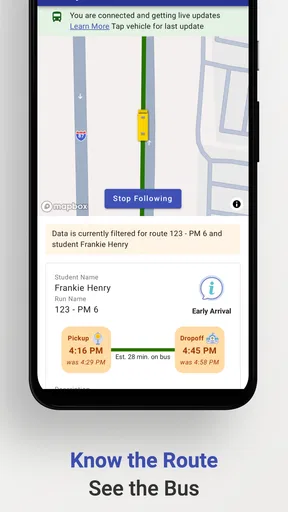
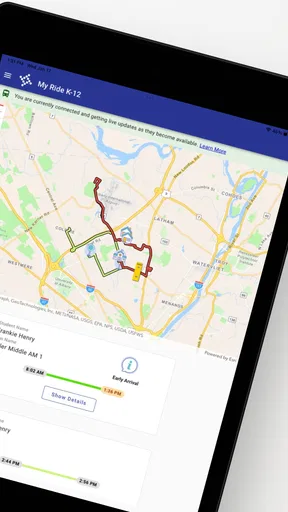
- Real-time bus tracking helps families follow routes and estimated arrivals.
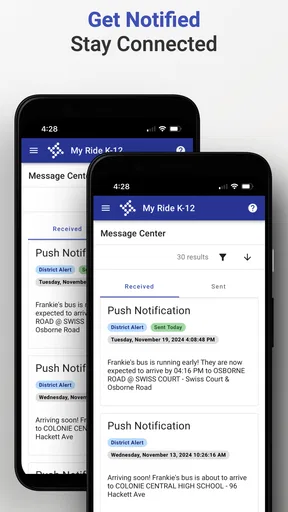
- Push notifications can alert parents about delays
- changes
- and trip events.
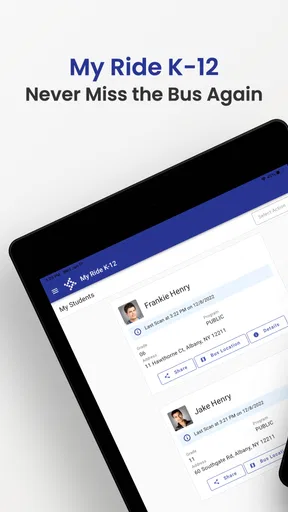
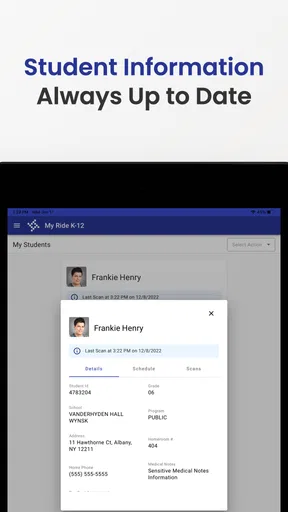
- Student rider information is kept accessible for authorized family members.
- Route details make it easier to confirm pickup and drop-off arrangements.
- Available on mobile devices for convenient access while commuting or traveling.
Cons
- Features depend on the school district’s setup and may vary by location.
- Tracking accuracy can be affected by weak GPS
- connectivity
- or delayed updates.
- Parents may need district-provided login credentials to use the app.
- Notifications can become excessive if several students or routes are linked.
- The interface may feel limited outside supported transportation programs.
FAQs for My Ride K-12
What is My Ride K-12 and who is it designed for?
My Ride K-12 is a school transportation tracking app designed for families whose children use participating school bus services. After signing in with the details provided by the school district or transportation provider, parents and guardians can typically view assigned routes, bus locations, estimated arrival times, and transportation alerts. Availability and features may vary depending on whether the local school system supports the platform.
How can I sign in to My Ride K-12?
Access usually depends on your child’s school district or transportation department. Parents may need an account created by the district, a student identification number, an email address, or other enrollment information. If your credentials do not work, the app may not be available for your district, your child’s transportation record may not yet be activated, or your account details may need to be updated by the school rather than through the app itself.
What information can parents see in the app?
The information shown depends on the transportation services enabled by your school district. In supported areas, My Ride K-12 may display a child’s assigned bus, route details, scheduled pickup and drop-off points, vehicle location, estimated arrival times, and service notifications. Some districts may also provide attendance-related transportation updates or alerts about delays, cancellations, route changes, and other important messages.
Does My Ride K-12 track the bus in real time?
The app can provide live or near-real-time bus tracking when the school district has connected its vehicles and tracking system to the service. Location updates may occasionally be delayed because of mobile coverage, GPS limitations, operational changes, or the driver beginning or ending a route. For safety and accuracy, the displayed arrival time should be treated as an estimate, not a guarantee that the bus will arrive at an exact minute.
What should I do if the bus information is missing or incorrect?
First, check that you are signed in with the correct account and that the selected student, school, route, and date are accurate. Closing and reopening the app, installing available updates, and checking your internet connection may resolve temporary display problems. If the route, stop, schedule, or student information remains incorrect, contact your school or district transportation office, because they normally control the underlying records.


